
How to Read Your MyFinHealth Report
A complete guide to understanding your MyFinHealth financial analysis report, including health scores, spending categories, and actionable recommendations.
Congratulations on taking the first step toward better financial health! After uploading your bank statements, you'll receive a comprehensive MyFinHealth report. This guide will walk you through every section so you can make the most of your insights.
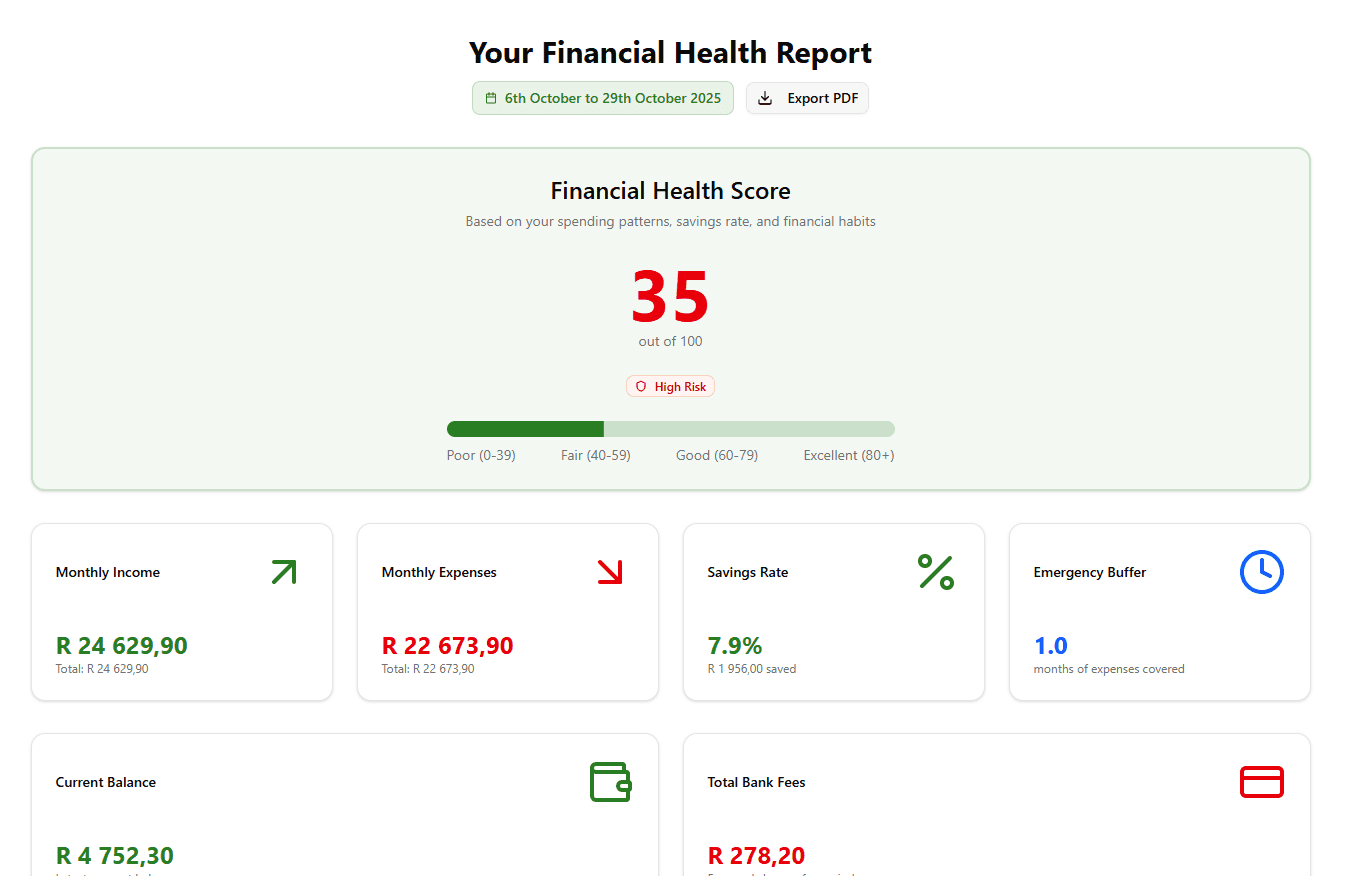
Understanding Your Financial Health Score
What Is the Score?
Your Financial Health Score is a number between 0-100 that represents your overall financial wellness. Think of it like a credit score, but focused on your day-to-day financial habits rather than just debt.
Score Breakdown:
- 80-100: Excellent 🌟 - You're doing great! Strong savings, manageable debt, and healthy spending habits.
- 60-79: Good ✅ - Solid foundation with room for improvement in specific areas.
- 40-59: Fair ⚠️ - Some concerning patterns that need attention.
- 0-39: Needs Work 🚨 - Urgent action required to improve financial stability.
What Affects Your Score?
Your score is calculated based on five key factors:
- Savings Rate (30%) - Percentage of income you save each month
- Debt-to-Income Ratio (25%) - How much debt you're carrying relative to income
- Spending Consistency (20%) - Whether you're living within your means
- Emergency Fund (15%) - Presence of financial cushion for unexpected expenses
- Income Stability (10%) - Regularity and reliability of income sources
Reading Your Spending Breakdown
Category Visualization
The pie chart in your report shows how your money is distributed across categories. Here's what each category typically includes:
Groceries & Food
- Supermarket purchases (Checkers, Pick n Pay, Woolworths)
- Restaurants and takeaways
- Food delivery (Uber Eats, Mr D Food)
Transport & Fuel
- Petrol/diesel purchases
- Uber/Bolt rides
- Public transport (Gautrain, MyCiTi)
- Vehicle maintenance
Entertainment & Leisure
- Streaming services (Netflix, Showmax, Spotify)
- Movies, concerts, events
- Hobbies and recreational activities
Bills & Utilities
- Electricity (prepaid/municipal)
- Water and rates
- Internet and phone contracts
- Insurance (car, home, life)
Debt Payments
- Credit card payments
- Personal loans
- Vehicle finance
- Home loan/bond
Shopping & Retail
- Clothing and fashion
- Electronics
- Home goods
- Online shopping (Takealot, Superbalist)
Health & Medical
- Pharmacy purchases
- Doctor visits
- Medical aid contributions
- Gym memberships
Interpreting the Percentages
A healthy spending breakdown typically looks like:
- Housing/Debt: 25-35%
- Transport: 10-15%
- Groceries: 10-15%
- Savings: 20%+
- Everything else: 30-35%
If your percentages are significantly different, your report will flag this and suggest adjustments.
Understanding Trend Analysis
Monthly Spending Trends
The line graph shows how your spending changes over time. Look for:
Red Flags:
- 📈 Steadily increasing spending - You might be lifestyle inflating
- 📊 High volatility - Inconsistent spending makes budgeting difficult
- 🔴 Spending above income - Unsustainable; likely accumulating debt
Positive Patterns:
- 📉 Decreasing trend - You're successfully cutting back
- ⚖️ Stable spending - Predictable expenses make planning easier
- 💚 Spending well below income - Room for savings and investments
Income vs. Expenses Chart
This bar chart comparison is critical:
- Green bars (Income) taller than red bars (Expenses): ✅ You're living within your means
- Red bars taller than green bars: ⚠️ You're spending more than you earn—debt may be growing
Actionable Recommendations
Your report includes personalized recommendations based on your specific financial situation. Here's how to prioritize them:
🚨 Critical Actions (Do These First)
These are urgent issues that could cause financial distress:
- "Reduce debt payments to below 40% of income" - Try our Debt Payoff Calculator for a clear payoff strategy
- "Build emergency fund of at least R5,000" - Use our Emergency Fund Calculator to set your target
- "Cancel unused subscriptions costing R500+/month"
⚠️ Important Improvements (Do These Soon)
Significant opportunities to improve financial health:
- "Increase savings rate from 5% to 15%"
- "Reduce grocery spending by R1,000/month"
- "Switch to cheaper cell phone contract"
💡 Optimization Tips (Nice to Have)
Fine-tuning for already-healthy finances:
- "Consider investing additional savings"
- "Review insurance coverage for better rates"
- "Automate savings transfers on payday"
Transaction Details Section
What You'll See
A detailed table of all categorized transactions, including:
- Date
- Description
- Amount (ZAR)
- Category
- Notes (if any unusual patterns detected)
How to Use This Section
- Verify Categorization - Check that algorithm categorized transactions correctly
- Spot Surprises - Look for charges you don't recognize
- Find Subscriptions - Search for recurring monthly charges
- Track Specific Merchants - See how much you spend at specific stores
Common Issues and How to Fix Them
Miscategorized Transaction? If the algorithm got something wrong (happens ~5% of the time), you can manually recategorize it before exporting your report.
Duplicate Transaction? Banks sometimes show pending and posted transactions. We filter most duplicates, but check dates and amounts if something looks off.
Missing Transaction? If your statement is image-based or has unusual formatting, some transactions might not extract. Upload a clearer statement or contact support.
Exporting Your Report
Available Formats
Depending on your plan, you can export:
- PDF Report - Full analysis with charts (all plans)
- Excel Spreadsheet - Raw transaction data for custom analysis (Pro & Ultimate)
- CSV File - Import into budgeting apps (Pro & Ultimate)
Best Practices for Exports
- Save monthly exports to track progress over time
- Share PDF with financial advisor for professional guidance
- Import Excel to Google Sheets for collaborative household budgeting
- Use CSV for accounting software if you're a freelancer/business owner
Taking Action After Your Report
Step 1: Acknowledge Your Current State
No judgment—just facts. Understanding where you are is the first step to improvement.
Step 2: Pick One Thing to Improve
Don't try to fix everything at once. Choose the biggest impact recommendation and focus on that for 30 days.
Step 3: Track Progress
Upload next month's statement to see if your changes are working. Small improvements add up!
Step 4: Celebrate Wins
Improved your score by 5 points? Reduced takeaway spending by R500? That's worth celebrating!
Frequently Asked Questions
How often should I run a report?
Monthly is ideal. Upload each new bank statement to track trends and measure progress.
Can I combine statements from multiple banks?
Yes! Upload statements from all your accounts for a complete financial picture. We support FNB Bank Fees 2026: Are You Overpaying R1,200/Year?(FNB), Standard Bank Fees 2026: When UCount Rewards Don't Cover Costs(Standard Bank), Capitec Credit Facility Costing You R2,400/Year? 2026 Fee Analysis(Capitec), and more.
What if I don't agree with the recommendations?
Recommendations are suggestions, not rules. Everyone's financial situation is unique. Take what works for you and ignore what doesn't.
How do I improve my score quickly?
Focus on savings rate and debt reduction—these have the biggest impact. Even small changes (saving an extra R500/month) will move the needle.
Is my data really secure?
Absolutely. Bank-grade encryption, automatic deletion after 30 days, and full POPIA compliance. We take your privacy seriously.
Need More Help?
Video Tutorial
Coming soon! We're creating video walkthroughs of sample reports.
One-on-One Support
Ultimate plan subscribers get phone support. Email support@myfinhealth.com to schedule a call.
Community Forum
Join other MyFinHealth users sharing tips and success stories (launching Q2 2026).
Ready to Generate Your Report?
If you haven't uploaded your statements yet, head to the upload page and get started. If you've already received your report, we hope this guide helps you make the most of your insights!
Want to understand the full service? Read How Does MyFinHealth Help You?. After reviewing your report, use our free calculators: SARS Tax Calculator or TFSA Calculator.
Questions or feedback? We'd love to hear from you at support@myfinhealth.com.
Written by
Steven
Founder, MyFinHealth